

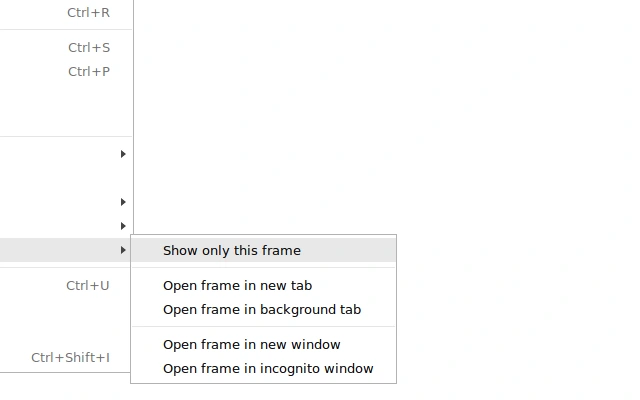
Description
Enhance Your Browser with Custom Context Menus
Overview
The This Frame Context Menu is a lightweight browser utility designed to enhance user interaction within web browsers by adding a dedicated "This Frame" option to the right-click context menu. Originally available through the Chrome Web Store, the extension has been updated to ensure compatibility with modern browser standards, specifically manifest_version 2. This update ensures continued functionality despite the original listing's unavailability.
Designed primarily for users who frequently interact with web content, the tool streamlines workflows by enabling quick access to frame-specific actions. It is particularly useful for developers, content curators, and power users who need precise control over embedded content within web pages. The extension supports multiple platforms, including Windows, Mac, and Linux, making it accessible across diverse computing environments.
By integrating directly into the browser’s context menu system, This Frame Context Menu eliminates the need for additional toolbars or complex workflows. It provides a seamless experience for users seeking to extract or manipulate content from specific frames within a webpage. The developer did not provide additional system requirements or detailed use case documentation.
Key Features & Capabilities
- Custom Context Menu Integration – Adds a dedicated "This Frame" option to the right-click menu, allowing users to perform actions on the currently selected frame.
- Manifest Version 2 Compatibility – Updated to meet current browser security and stability standards, ensuring long-term usability.
- Platform-Agnostic Design – Fully functional on Windows, Mac, and Linux systems, supporting a broad user base.
- Minimal Resource Usage – With a file size of just 1.4 MB, the extension is optimized for performance and fast loading.
- Lightweight & Secure – Built with minimal permissions, reducing potential security risks while maintaining core functionality.
For developers, this tool simplifies the process of inspecting or extracting content from embedded iframes. Content creators can use it to quickly identify and manage frame-specific elements during website audits or content compilation. The extension operates entirely within the browser environment, requiring no external dependencies.
Users benefit from a streamlined workflow that reduces the number of steps needed to access frame-level actions. The feature is particularly valuable in scenarios involving multi-frame web applications or complex web layouts where precise targeting is essential.
User Interface, Workflow & Performance
The user interface of This Frame Context Menu is minimal and unobtrusive. It integrates directly into the browser’s standard right-click context menu without altering the visual layout or adding visible components to the browser window. The interface remains consistent across supported platforms, ensuring a familiar experience for users on Windows, Mac, and Linux.
Navigating through the extension’s functionality is straightforward: right-click on any frame within a webpage to access the "This Frame" option. No additional configuration or setup is required, contributing to a seamless onboarding process. The workflow is efficient, reducing the time needed to perform frame-specific actions.
Performance details were not specified by the developer. However, the extension’s small size of 1.4 MB suggests low memory and CPU overhead. The developer did not specify resource usage details. General software behavior patterns indicate stable operation under normal browsing conditions. Stability appears to be maintained through the use of updated manifest standards, though real-world testing data is not available.
Compatibility & System Requirements
This Frame Context Menu is compatible with Windows, Mac, and Linux operating systems. It is designed to function within modern web browsers that support manifest_version 2 extensions. The installation size is 1.4 MB, which is considered minimal for a browser extension.
Exact system requirements were not listed. The developer did not provide information on minimum hardware specifications, such as RAM or CPU requirements. Compatibility information was partially provided, with platform support confirmed for major desktop operating systems.
Users should ensure their browser is updated to a version that supports manifest_version 2. While the extension is intended for desktop environments, no information was provided about mobile or tablet compatibility.
Pros and Cons
Pros
- Lightweight design with minimal file size (1.4 MB)
- Updated for manifest_version 2 for improved compatibility
- Available for Windows, Mac, and Linux users
- Simple, intuitive integration into the browser context menu
- Free to download and use with no licensing restrictions
Cons
- No detailed documentation or user guide provided
- Exact performance metrics and resource usage not specified
- Limited to browser-based functionality; no standalone desktop application
- Developer information not disclosed
- No information on update frequency or future development plans
FAQ Section
Is This Frame Context Menu compatible with my operating system?
The extension is compatible with Windows, Mac, and Linux systems. It functions within supported web browsers on these platforms.
Is the software free to use?
Yes, This Frame Context Menu is available at no cost. There are no subscription fees or in-app purchases.
Does the extension require internet access to function?
The extension operates within the browser environment and may require internet access to interact with web content. However, it does not transmit user data unless explicitly permitted by the user.
How do I install this extension?
Users can install the extension by downloading the .crx file or loading it manually into a compatible browser that supports manifest_version 2.
Is the extension secure to use?
The extension is designed with minimal permissions and a small footprint, which reduces potential security risks. However, users should only install extensions from trusted sources.
Final Thoughts & CTA
This Frame Context Menu delivers a focused, efficient enhancement for users who need precise control over web page frames. Its lightweight nature, cross-platform availability, and updated compatibility make it a reliable tool for developers and power users alike. While detailed documentation and performance data are limited, the extension fulfills its core purpose with minimal friction.
For those seeking a simple, free way to improve browser interaction, especially in complex web environments, this tool offers tangible benefits. It stands out as a practical utility for anyone who frequently works with embedded content.
Download This Frame Context Menu now
Guides & Tutorials for This Frame" Context Menu Extension for Chrome
How to install This Frame" Context Menu Extension for Chrome
- Click the Preview / Download button above.
- Once redirected, accept the terms and click Install.
- Wait for the This Frame" Context Menu Extension for Chrome download to finish on your device.
How to use This Frame" Context Menu Extension for Chrome
This software is primarily used for its core features described above. Open the app after installation to explore its capabilities.
User Reviews for This Frame" Context Menu Extension for Chrome 0
No reviews found





